Push Notifications
Stay informed about your Kia EV6 with system-wide push notifications on iOS and Android. As a Progressive Web App (PWA), mykia.app delivers native-style notifications directly to your device — no app store required. Choose from standard threshold alerts and AI-powered smart insights.
How It Works
mykia.app uses the Web Push API and a service worker to deliver notifications. Once you install the PWA and grant notification permissions, alerts appear in your device's notification center just like any native app — on the lock screen, in the notification shade, and with sound and vibration.
Add mykia.app to your home screen from the browser
Allow notifications when prompted by the app
Receive alerts on your lock screen, even when the app is closed
Standard Notifications
Rule-based alerts that trigger when vehicle data crosses a configured threshold. The server checks every 2 minutes for new conditions.
Triggered when the vehicle transitions from charging to not charging.
Body: "Your EV6 finished charging. Battery at 80%."
Triggered when the estimated remaining charge time drops below a configurable threshold.
Triggered when the battery level drops below a configurable percentage.
Triggered when the vehicle reports a tire pressure warning on any tire.
Triggered when the 12V auxiliary battery drops below a configurable threshold. A failing 12V battery can prevent the vehicle from starting.
Smart Insights
AI-powered and pattern-based notifications that analyze your driving and charging behavior over time. The server runs smart checks hourly and AI analysis twice daily.
Detects your regular charging days by analyzing the past 8 weeks. If a day has 3 or more charging sessions in that period and you haven't charged today, a reminder is sent between 6-10 PM.
Monitors battery drain while the vehicle is parked. Compares the current drain rate against your 30-day average. Triggers if the drain is more than 2x the average over a period of 4+ hours.
Compares your past week's driving efficiency (km/kWh) against your long-term average. Sends a notification around 9 PM if the change exceeds 10% in either direction — both improvements and drops.
A weekly digest sent every Sunday evening summarizing your driving activity: total distance, number of trips, and average efficiency for the week.
Monitors battery State of Health (SOH) over time. Triggers if SOH drops more than 0.5% within the past 30 days. Checked daily around 9 PM.
Twice daily (morning 7-9 AM and evening 7-9 PM), a configurable AI model analyzes your vehicle data and generates findings. Each finding includes a severity level and is sent as an individual notification. Up to 3 findings per analysis cycle.
Sent when you unlock a new achievement in the gamification system. Includes the achievement icon, name, and tier.
Achievements
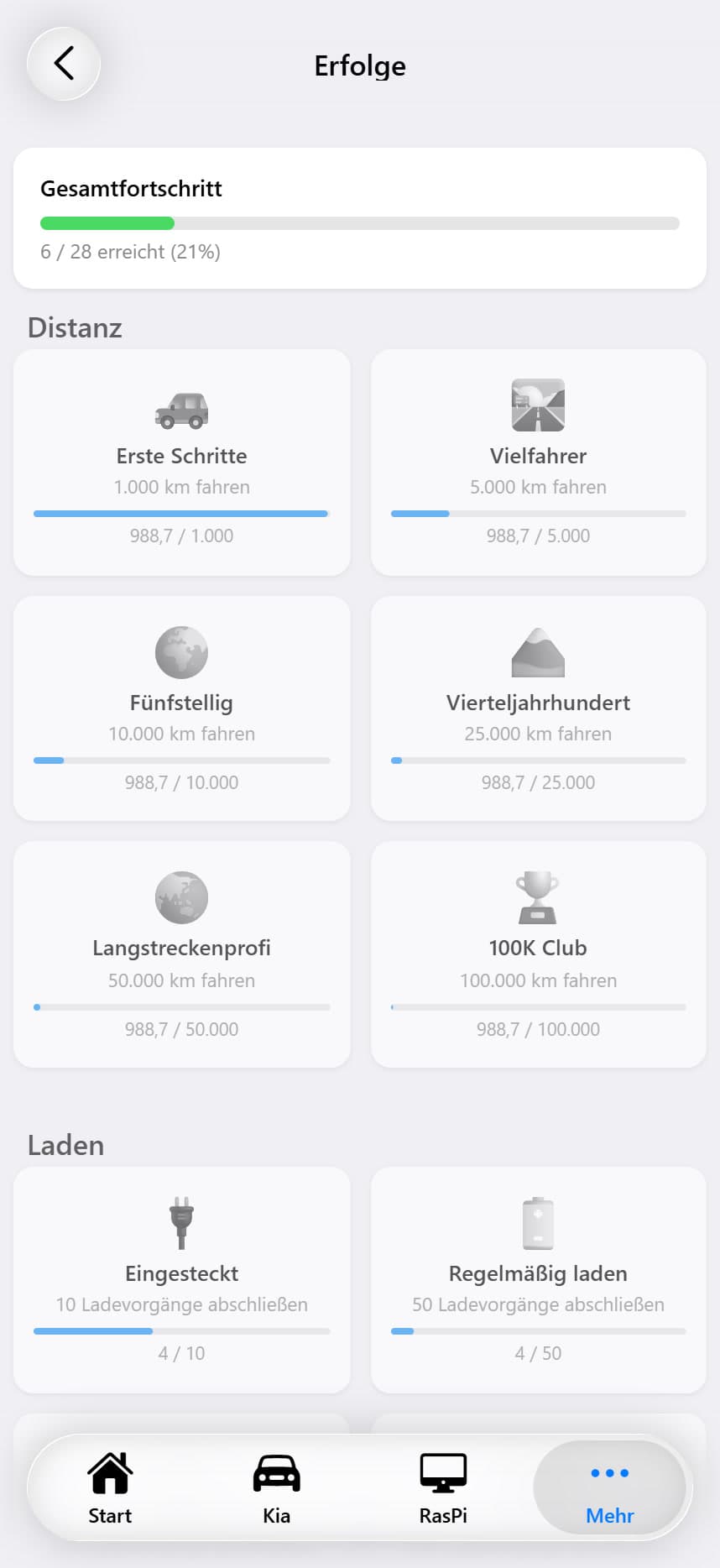
A gamification system with 28 achievements across 6 categories. Track your driving milestones, charging habits, and efficiency records. Each achievement shows live progress toward its goal, and unlocking one triggers a push notification and an in-app toast.
Overall Progress
A progress card at the top of the achievements page shows how many of the 28 achievements have been unlocked, with a green progress bar. Newly earned achievements that haven't been viewed yet trigger a toast notification with the count.
Milestones based on total odometer distance. Progress is tracked from the latest vehicle_log entry.
Getting Started
1,000 km
Road Warrior
5,000 km
Five Digits
10,000 km
Quarter Century
25,000 km
Long Hauler
50,000 km
100K Club
100,000 km
Tracks charging session count, total energy charged, and first DC fast charge. Derived from the charging_sessions table.
Plugged In
10 sessions
Regular Charger
50 sessions
Charge Master
100 sessions
Power Station
500 sessions
Fast & Furious
First DC charge
First Hundred
100 kWh
Megawatt Hour
1,000 kWh
Power Hungry
5,000 kWh
Total trip count milestones and single-trip distance records. Uses data from the Kia trip endpoint.
First Drive
1 trip
Century Rider
100 trips
Frequent Flyer
500 trips
Road Legend
1,000 trips
Day Tripper
50 km single trip
Explorer
100 km single trip
Voyager
200 km single trip
Expedition
300 km single trip
Efficient Driver
6+ km/kWh
Hypermiler
7+ km/kWh
Based on best daily efficiency from daily_driving_stats.
Weekly Streak
7 consecutive days
Monthly Streak
30 consecutive days
Days with at least one recorded trip count toward the streak.
Night Owl
Trip after 22:00
Early Bird
Trip before 06:00
Time-based achievements use Berlin timezone.
Achievement Card Display
✅ Earned
Green border, full-color icon, checkmark badge in the top-right corner.
🔒 Locked
Reduced opacity, grayscale icon, blue progress bar showing current / target progress.
Achievement Notifications
When a new achievement is unlocked, two things happen simultaneously:
Achievement progress is re-evaluated during each smart notification check cycle. The system compares newly earned achievements against a 'seen' list stored per user. Progress data refreshes every 5 minutes in the frontend.
Notification Settings
Every notification type can be individually enabled or disabled in the settings. The settings page is divided into two sections: Standard Notifications and Smart Insights. Three notifications also have configurable thresholds.
Master Toggle
A main 'Push Notifications' toggle controls the overall subscription. When turned on, the app registers a push subscription with the server. When turned off, the subscription is removed and no notifications are sent. If the browser has blocked notification permissions, a 'Blocked' status is shown.
Configurable Thresholds
Charge Time
5-120 min, default 30
Battery Low
5-50%, default 20%
12V Battery
20-80%, default 50%
Test Notification
A 'Send Test Notification' button verifies that push delivery is working correctly on your device.
Notification History
All sent notifications are stored in a notification log and accessible from the app. The history page provides a complete record of every alert and insight.
List View
Notifications are grouped by date (Today, Yesterday, or specific dates) and sorted newest first. Each entry shows an icon matching its category, the title and body text, and a timestamp. Unread notifications display a blue dot indicator. Smart insights use a different color scheme (deep orange) to distinguish them from standard alerts (blue). Swipe left on any entry to delete it.
Detail View
Tapping a notification opens a detail view showing the full message, a large category icon, the exact timestamp, and a 'Trigger Details' section. This section displays the notification-specific metadata in a table — for example, the battery percentage that triggered a low-battery alert, the drain rate for a parked-drain anomaly, or the efficiency comparison data for a trend notification.
Bulk Actions
Mark all notifications as read or delete all notifications with a single action.